CHAPTER 4: DRUMS
4.1 Load the drum kit
A kit fills 8 instruments in a row with factory sounds.
- Go to the INSTR screen.
- Choose the first instrument for the kit, for example
10. Hold C= and press RIGHT until the title shows10, or type10in the title field. - Move the cursor to
PRESET. - Hold CTRL and press SPACE. Instruments
10–17now hold kick, snare, closed hat, open hat, tom, clap, rim and crash. The help line will showDRUMS 10-17. - Release CTRL.
While you hold CTRL, each further press of SPACE puts the next kit in the same 8 instruments: BAND, SYNTH, then DRUMS again.
4.2 Write a beat in the drum view (REU)
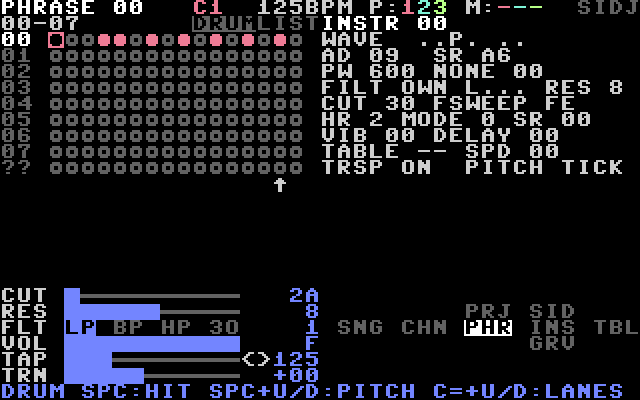
The drum view shows one phrase as 8 lanes (one per instrument) by 16 steps.
- Make a chain and a phrase on channel 3, as in 3.2 and 3.3.
- On the PHRASE screen, hold SHIFT and press CLR/HOME. The drum view appears. Its lanes start at the instrument you chose on the INSTR screen.
- LEFT and RIGHT select the step. UP and DOWN select the lane.
- Press SPACE to place a hit. You hear it. Press SPACE on the same lane again to remove it.
- Press C= + SPACE to clear the step.
- Hold SPACE and press UP or DOWN to tune the hit one semitone up or down.
- Hold C= and press UP or DOWN to shift the lanes by one instrument.
Each step holds one hit. A hit on another lane replaces it.
Press CLR/HOME (without SHIFT) to go back to the list.
4.3 Write a beat in the phrase list
- On the PHRASE screen, move to step
0, instrument column, and type10(kick). - Move to the note column and press SPACE. If the note is not
C-4, typeCand4. - On step
4, press SPACE in the note column. Then type11(snare) in the instrument column. - Continue with steps
8andC.