CHAPTER 14: T.A.S.T.E.
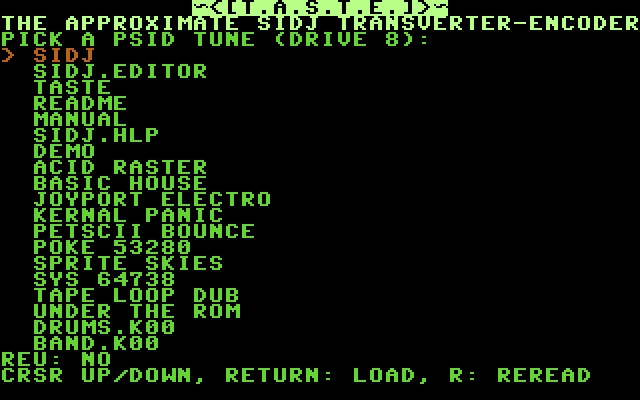
T.A.S.T.E. (The Approximate SidJ Transverter-Encoder) is a separate program for your Commodore 64. It plays part of a .sid tune, writes down the notes, and saves them as a SIDJ project. The result is approximate. Use it as a starting point.
14.1 To convert a tune
- Copy
TASTEand the.sidfiles onto one disk and insert it in drive 8. - Type
LOAD"TASTE",8and press RETURN. - Type
RUNand press RETURN. - The screen will show the files on the disk. Select a tune with UP/DOWN and press RETURN. Press
Rto read the directory again. - The screen will show the tune's name, author, addresses, number of songs and
REU: YESorREU: NO. - Set the options (14.2).
- Press RETURN. T.A.S.T.E. runs the tune and saves the project on drive 8 under the output name. If the file exists, the screen will show
FILE EXISTS. REPLACE IT? (Y/N). - Load SIDJ and load the project.
Press RUN/STOP to stop a capture. Press F1 to go back to the file list.
14.2 Options
UP and DOWN select a row. LEFT and RIGHT change the value. + and - change it in larger steps.
| Option | Meaning |
|---|---|
| SUBTUNE | which song in the file |
| VOICES | which SID voices to record; press 1, 2 or 3 to switch each on or off |
| START (S) | seconds to skip before recording, 0–999 |
| LENGTH | how many steps to record; the screen also shows the song rows needed |
| FRAMES/STEP | the length of a step in frames; AUTO lets T.A.S.T.E. find it |
| NOTES | OFF: every note is C-4 (rhythm only) |
| INSTRUMENTS | OFF: every note uses instrument 00 |
| NOTE-OFFS | OFF: no K commands |
| OUTPUT NAME | the file name, up to 16 characters; DEL deletes |
Each voice goes to the SIDJ channel with the same number. Each different sound becomes an instrument, up to 64, with waveform, envelope and pulse width. Filter, sweeps, vibrato and wave tables are not recorded.
14.3 Limits
- Only PSID files. RSID files and tunes without a play address are refused.
- With an REU (256K or more): up to 256 song rows (16384 steps). The tune may use nearly all of the memory.
- Without an REU: up to 512 steps. The tune must load inside
$0800–$9FFFor$E000–$FFFF. A tune that writes over T.A.S.T.E. stops withTUNE OVERWRITES T.A.S.T.E. KEY: RESET. - When the project runs out of phrases or chains, the recording ends early and the screen shows
CUT AT STEP n. - Tunes that play several times per frame on the screen interrupt are recorded once per frame.