CHAPTER 10: LIVE MODE
In live mode each channel repeats one chain. You choose the next chain for each channel, and it starts when the playing chain ends. Chains of different lengths play against each other.
10.1 To switch live mode on and off
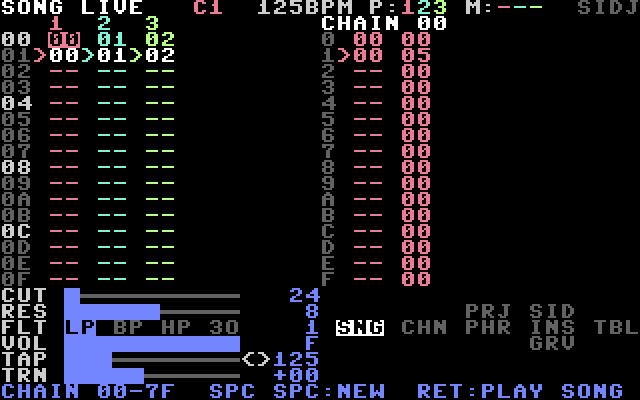
On the SONG screen, press CTRL + LEFT. The status line shows LIVE. Press CTRL + LEFT again to go back to song mode.
10.2 To queue chains
On the SONG screen in live mode:
| Keys | Effect |
|---|---|
| RETURN | queue the chain under the cursor |
| RETURN, RETURN | the same, but switch at the end of the playing phrase |
| CTRL + RETURN | queue a stop of the cursor's channel |
| CTRL + RETURN, CTRL + RETURN | stop at the end of the playing phrase |
| hold LEFT (SHIFT + CRSR ⇨), press RETURN | queue the whole row |
A stopped channel starts in time with the channels that play.
The screen shows the playing chain with > and a white field, a queued chain with a blinking *, and a queued stop with a blinking X in the channel header.
10.3 Mute and solo
As in 6.7: F1, F3, F5; hold C= and press CTRL; C= + RETURN. With the mouse, click a channel header to mute, right-click to solo.
10.4 Live FX faders (mouse)
Rows 18 to 23 hold six faders. They are on every screen and are used with the mouse.
| Row | Fader | Range |
|---|---|---|
| CUT | filter cutoff | 00–FF |
| RES | resonance | 0–F |
| FLT | filter type: switches LP, BP, HP, 3O | |
| VOL | volume | 0–F |
| TAP | tempo, tap and nudge | 40–295 |
| TRN | transpose | −12 to +12 |
- Drag on a bar to set the value. The fader now holds: it replaces what instruments, tables and commands set. The label is reversed and the bar turns yellow.
- Click LP, BP, HP or 3O on the FLT row to switch that filter type on or off.
- Click a label to hold the value shown.
- Right-click a row, or click it with C= held, to let go. The song's own values return.
- TAP row: the bar sets the project tempo. Click
TAPin time to tap. Hold<or>to nudge.
The TRN fader moves new notes on all channels, for instruments with TRANSP ON.
10.5 Recording loops
On the PHRASE screen you can play notes on the keyboard and record them into the playing phrase.
Piano mode. Press F4 (SHIFT + F3). The help line shows PIANO +-:OCTAVE. Two rows of keys are a piano:
| Keys | Notes |
|---|---|
| Z S X D C V G B H N J M | C to B |
| Q 2 W 3 E R 5 T 6 Y 7 U | C to B, one octave higher |
| + / − | octave up / down (0–6) |
A key plays the last instrument you entered on the cursor's channel. It writes nothing. While piano mode is on, typing notes and values is off. Press SHIFT + F3 again to switch it off.
To record (REU).
- Put the cursor on the phrase and press RETURN, so its channel plays it.
- Press F6 (SHIFT + F5). The phrase now loops, and
RECshows at the right of the help line. - Play the piano keys. Each note sounds at once and goes into the nearest step, over what is there. A note late in a step goes into the next step.
- Hold C= to erase the steps that the playhead passes.
- Press SHIFT + F5 again to stop.
The whole take is one undo step: press F7 to remove it.
Beat repeat. Hold one of these keys to repeat the last steps of every channel: , 8 steps, . 4 steps, / 2 steps, ; 1 step. Let go and the song plays on. In live mode the queued chains wait until you let go.
10.6 The mouse in live mode
On the SONG screen in live mode:
- Click a chain to queue it.
- Click it twice to queue it at the end of the playing phrase.
- Right-click a chain to queue a stop of its channel.